Pricing Types
Based on the type of product, this page will look different. There are several ways to price a product, depending on the type of product.
There are 3 types of products;
- Simple Products
- Simple Products With Variants
- Custom Products
Simple Product Pricing
If your product is a simple product without variants, you will simply enter the price you want to charge, unless you are using a Product Pricing Rule.
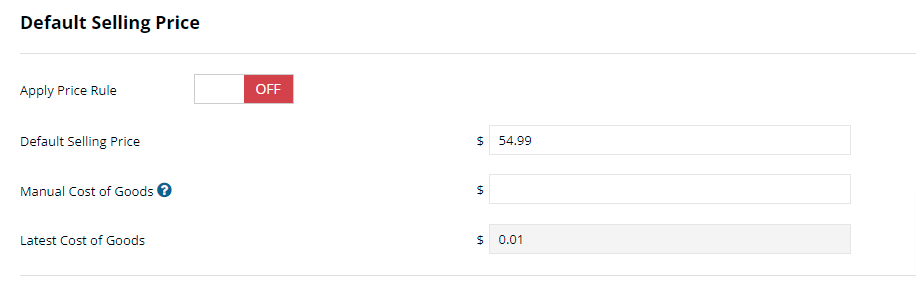
Apply Price Rule – Toggle to ON and select an existing pricing rule
Default Selling Price – Enter the price you want to charge for the product. If a pricing rule is on, this will update based on the pricing rule and cannot be altered.
Manual Cost of Goods
Enter the amount you pay for the product.
Latest Cost of Goods – If there is no manual cost of goods, we will track the cost of goods based on price you pay when you add inventory or if you have added a supplier product the price you pay.
Simple Product with Variants
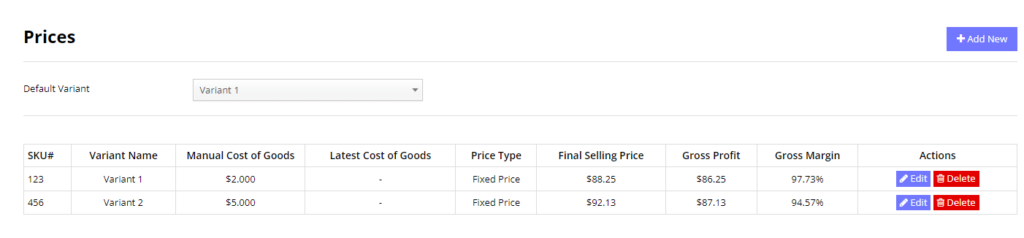
Variants are a specific version or model of a product, which may include various sizes or colors etc.
Each variant can be sold at a different price, so each variant has its own pricing options.
Each Variant will have a SKU#, a Variant Name, Manual or Latest Cost of Goods. You can add a new variant by clicking on “Add New” and filling out the form.
The default Variant will be the first Variant option shown to customers
Custom Products
There are 3 ways to price a custom product.
- Fixed Amount & Fixed Price
- Fixed Amount & Variable Price
- Variable Amount & Variable Price
Fixed Amount & Fixed Price
This option lets you force a customer to buy a specific amount, and you want to choose the exact price they pay for that amount.